AI credits
AI credits are the one currency for everything that runs on AI in Ultimo Bots: the answers your agent gives and the work Mo, the AI builder, does for you. This page explains what things cost, how many credits each plan includes, and what happens when they run out.
Credits belong to an agent. Each agent has its own balance, filled by its plan and by any extra credits you buy for it. Your agent's answers to visitors and Mo's work in AI Studio both take from that same balance, so you always see one number.
What an answer costs
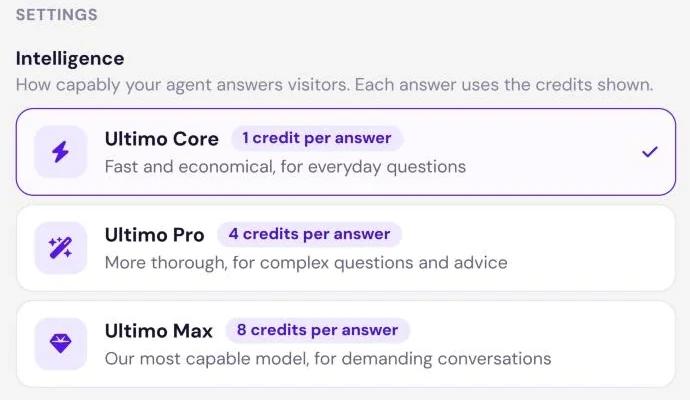
Every answer your agent sends costs a fixed number of credits. How many depends on the agent's Intelligence level, which you choose in AI Studio › Your agent › Profile:
| Level | Best for | Credits per answer | Available on |
|---|---|---|---|
| Ultimo Core | Fast and economical, for everyday questions | 1 | Every plan (the default) |
| Ultimo Pro | More thorough, for complex questions and advice | 4 | Paid plans |
| Ultimo Max | Our most capable level, for demanding conversations | 8 | Paid plans |
New agents answer on Ultimo Core. Agents on the Free plan always answer on Ultimo Core; the other levels show a Paid plan lock and take you to billing. When you switch to a level that costs more per answer, a short dialog (More credits per answer) tells you the new price before anything changes. Switching to a cheaper level saves right away.
What uses credits
- Answers to visitors on every channel: the website widget, the chat link, and connected messaging apps. Each answer costs the price of the agent's level.
- Test answers. When you chat with your agent in Test or in the Test step while creating an agent, each answer costs the same as a real one.
- Mo's test conversations. When Mo tests your agent, each answer in that test costs the agent's answer price, just like your own tests.
- Mo's work in AI Studio, explained in the next section.
Some things never use credits:
- The notice visitors see while the agent is paused (see When credits run out).
- Replies your team writes by hand in Live Chat.
- The automatic answer check, if it is switched on. It is included in the price of the answer.
- An answer on a messaging app that was never delivered because a person from your team took over first. Its credits are given back.
What Mo costs
Mo does not have a fixed price per message. Each request costs what Mo's work on it really costs, converted into credits and rounded up to whole credits. A quick question costs a few credits; building a skill, connecting an app, and testing it cost more. After every request, a short usage line under Mo's reply shows Mo used N credits and how many are left.
Like your agent, Mo works on three levels. You pick the level in the menu next to the send button in Mo's input (Mo's intelligence):
| Mo's level | Best for | Most one request can use | Available on |
|---|---|---|---|
| Ultimo Core | Quick answers and small changes | 50 credits | Every plan |
| Ultimo Pro | Recommended for building skills | 75 credits | Paid plans (the default) |
| Ultimo Max | Complex skills and integrations | 125 credits | Paid plans |
- Pro and Max at half price. On Mo's Pro and Max levels you pay only half of the real cost of Mo's work. Each credit covers twice as much work as on Core.
- Free agents use Mo on Ultimo Core. Pro and Max need a paid plan.
- A ceiling per request. The maximum in the table is a cap, not a price. Most requests cost far less. When you switch Mo to a higher level, a dialog (Mo will use more credits) shows the new ceiling first.
Mo never takes you below zero
Before Mo starts a request, it sets aside a budget from your balance: the ceiling of its level, or less if you have fewer credits left. When the request ends, Mo is charged what the work really cost, never more than you have. If the work cost more than your balance, the usage line says the rest is on us and you pay nothing extra. The budget set aside is not spent: your agent keeps answering visitors from your full balance while Mo works.
- Mo needs at least 5 credits to start. Below that, Mo replies Mo has run out of AI credits. Add credits or choose a bigger plan, then Mo continues.
- When a request reaches its ceiling, Mo stops with The cost limit for this step was reached. Write continue to go on. Writing continue starts a new request with a new budget.
- Stopping a request charges only the work done until then.
How many credits each plan includes
| Plan | AI credits | Renewed |
|---|---|---|
| Free | 20 | Once, not renewed |
| Smart | 500 | Every monthly period |
| Boost | 2,000 | Every monthly period |
| Ultimo | 10,000 | Every monthly period |
- Free plan. A Free agent receives 20 AI credits once, for answers and Mo together. They do not renew. If you upgrade, any Free credits you have not used stay with the agent.
- Paid plans. Plan credits arrive at the start of each monthly period, counted from the day the subscription started. This is also true on yearly billing: credits come month by month.
- Plan credits expire at the end of the period. Unused plan credits do not carry over. The next period starts with a fresh allowance.
- Changing plans. When you move to another plan, the new plan's credits replace the plan credits that were left from the old one.
- Per agent. Credits do not pool across agents. Each agent needs a plan that fits its own traffic.
As a rough guide: on Ultimo Core, Smart's 500 credits cover up to 500 answers in a period. On Ultimo Pro the same credits cover up to 125 answers, because each answer costs 4. Anything Mo does in the same period comes out of the same credits.
Extra AI credits
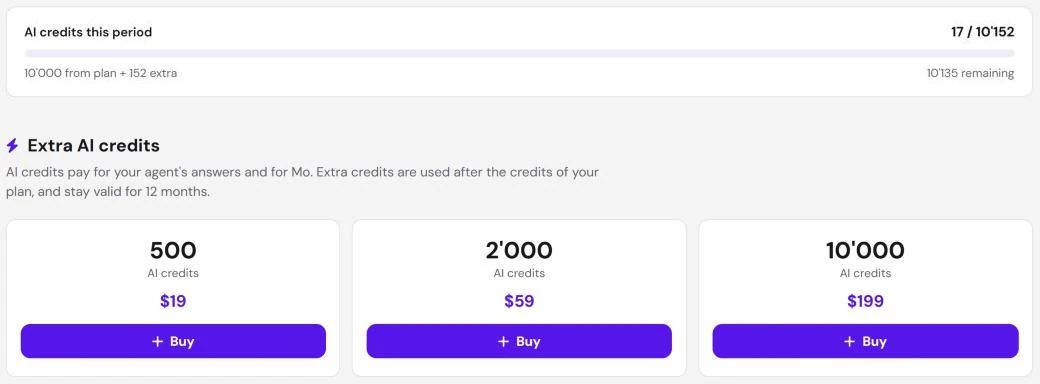
If an agent needs more credits before its next period, you can buy Extra AI credits on its billing page instead of moving to a bigger plan. Pack sizes and prices are shown there.
- Paid plans only. On the Free plan the section is visible but locked: upgrade the agent to a paid plan first.
- Valid for 12 months. Extra credits do not expire at the end of a period. They stay until you use them or until 12 months have passed.
- Used after your plan credits. Credits that expire soonest are spent first, so the plan credits of the current period go before extra credits.
- Paid through Stripe. Extra credits are a one-time payment through Stripe, also for agents whose plan is billed by Wix. The receipts appear under Invoices & receipts on the billing page.
When credits run out
There is no grace period. Your agent answers as long as its balance can pay for the next answer, and pauses as soon as it cannot. On Ultimo Pro, for example, an agent with 3 credits left pauses, because the next answer costs 4.
While the agent is paused, visitors who write to it read:
The link in that message leads the owner to the place where the plan can be upgraded. Mo stops too: it does not start a request below 5 credits (see Mo never takes you below zero).
Your agent answers again as soon as one of these happens:
- You buy Extra AI credits.
- You upgrade the agent to a bigger plan.
- A new monthly period starts and brings fresh plan credits.
Where you see your credits
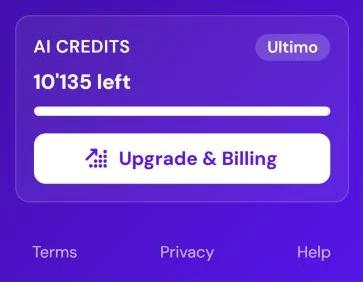
- Sidebar. At the bottom of the sidebar, the AI credits box shows the agent's plan, how many credits are left (N left), and the Upgrade & Billing button.
- AI Studio. Under Mo's input, a chip shows N credits left. Click it to open billing.
- After each Mo request. The usage line shows what the request used and what is left.
- Billing page. The meter at the top, AI credits this period, shows credits used against the total, how many come from the plan and how many are extra, and how many remain.
- Agents list. An agent that has used up its credits shows a Limit reached badge on its card.
Get warned before you run out
In Notifications, the Usage limit warning tells you when an agent has used a share of its credits. Choose when it fires: at 50, 80, 90, or 95 percent. The default is 80 percent. It is sent once per period, in-app and by email by default, and you can add Slack or Telegram.
When an agent's credits are fully used up, you always get an email and an in-app notice. That one cannot be switched off, because it means the agent has stopped answering.