Activity
Insights
Insights is the numbers view of your agent. It shows how many conversations you are getting, how much your agent is being used, how fast it replies, where your visitors are, and how all of that changes over time.
You open Insights from the Activity area of the dashboard. It is a read-only overview: there is nothing to configure here, you just choose which agents and which dates you want to look at, and the page does the rest. Every number is calculated from your real conversation history for the period you select.
Insights is one of the Activity views (alongside Conversations, Leads, and Reporting). The agent picker and the date range you choose are shared across these views, so the agents and period you set here carry over as you move between them.
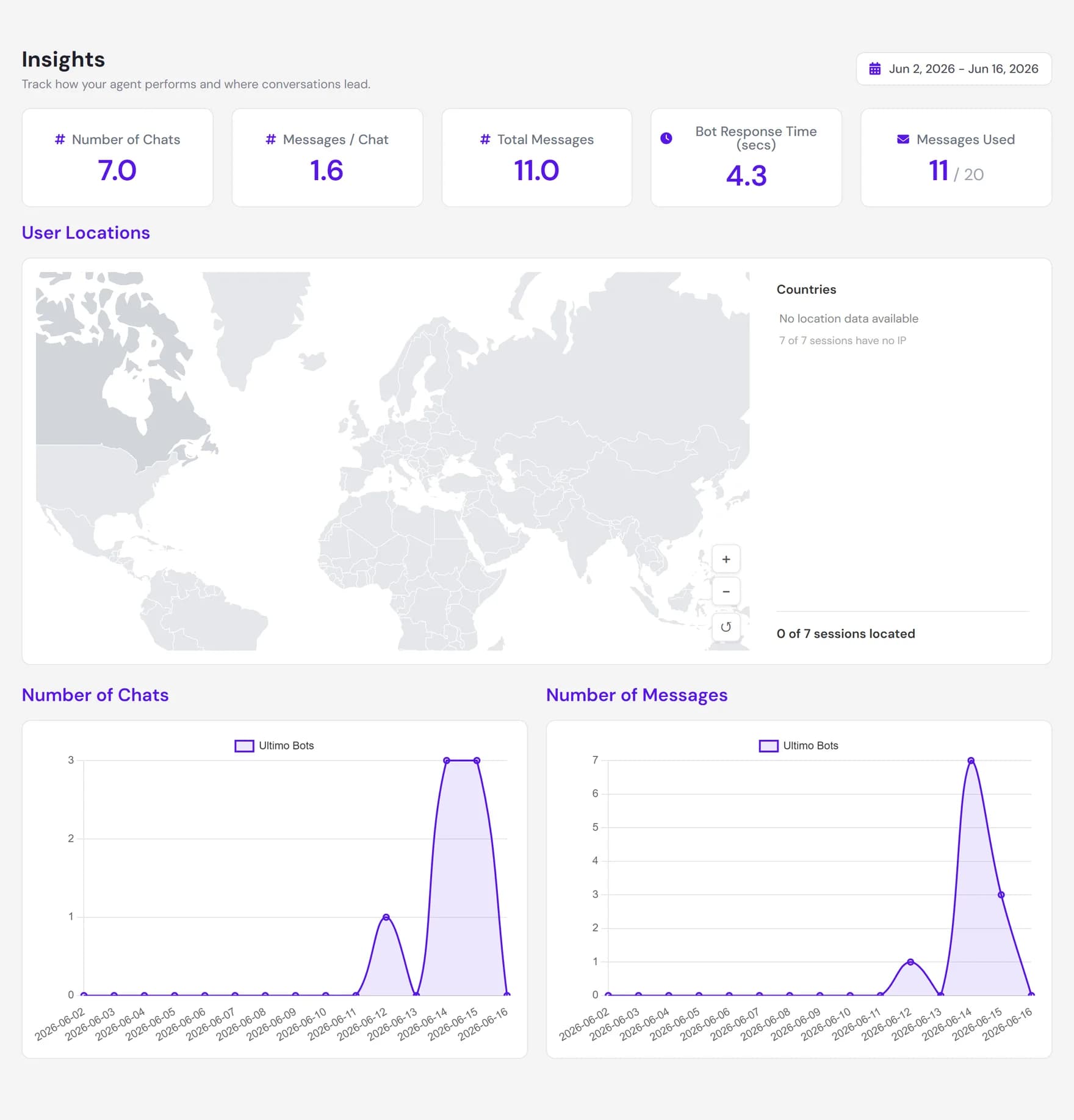
What Insights shows
The page is built from three parts, in order from top to bottom:
- Five metric cards with the headline numbers for the period: number of chats, messages per chat, total messages, response time, and messages used against your plan.
- A visitor country map that shades each country by how many conversations came from it, so you can see where your audience is.
- Two activity charts that plot chats and messages day by day across the selected range, so you can spot trends and busy days.
The five headline metrics
The cards across the top are the quickest read of how your agent is doing. Each value is calculated only from the agents and dates you have selected.
| Metric | What it means |
|---|---|
| Number of Chats | The count of unique conversations (sessions) in the period. One visitor who chats once counts as one, no matter how many messages they send. |
| Messages / Chat | The average number of visitor messages per conversation. A higher number usually means visitors are having longer back-and-forth exchanges. |
| Total Messages | The total number of visitor messages across all conversations in the period. This counts messages sent by visitors, not the agent's replies. |
| Bot Response Time (secs) | The average time, in seconds, between a visitor's message and the agent's reply. It is measured per reply and averaged across the period. |
| Messages Used | How many messages the selected agents have used against their plan allowance in the current billing cycle, shown as used out of total (for example 320 / 2,000). |
Country map and trends over time
Below the metric cards, two views help you read the shape of your traffic rather than a single number.
- Visitor country map. A world map shades each country by how many conversations came from it. Hover a country to see its name and count, and zoom or pan to focus on a region. Locations are looked up from visitor network addresses, so they are a good guide rather than a guaranteed exact location.
- Number of Chats over time. A line chart of how many unique conversations happened on each day in the range. Good for spotting your busiest days and any week-on-week trend.
- Number of Messages over time. A line chart of how many visitor messages were sent on each day. When you have several agents selected, each agent is drawn as its own line so you can compare them at a glance.
Choosing a date range
The date selector sits in the selector bar above the page, shared across the Activity views. When you first open the page it shows the last 14 days. Pick a start day and an end day to look at any other window, and the metrics, map, and charts all refresh together for that exact period.
Comparing across agents
If you run more than one agent, Insights can show them together. Use the agent picker to select which agents to include. You can view a single agent on its own, or select several to see a combined picture, with the country map and metric cards adding their numbers together.
- Up to five agents at once. You can have a maximum of five agents selected at the same time. The picker shows how many you have chosen and stops you from adding a sixth.
- Per-agent lines on the charts. Each selected agent appears as its own line on the Messages over time chart, which is the easiest way to see which agent is busiest.
- Per-agent breakdown in the cards. Hovering a metric card splits the total back out by agent, so a combined number never hides which agent it came from.
How to act on what you see
Insights is most useful when it points you to a next step. A few common reads:
- Lots of chats but few leads? Visitors are engaging but not leaving their details. Review your Leads and tighten when and how the agent asks for contact information.
- High messages per chat? Conversations are running long, which can mean the answer is not landing quickly. Read those conversations in Conversations to see where visitors get stuck.
- Messages used climbing fast? Keep an eye on the Messages Used card so you are not surprised at the end of the billing cycle, and upgrade the plan if you need more headroom.
- Traffic from an unexpected country? The map can reveal an audience you did not plan for, which may be a reason to add knowledge or support for another language.
Where to go next
Insights tells you what is happening. These pages let you act on it: